
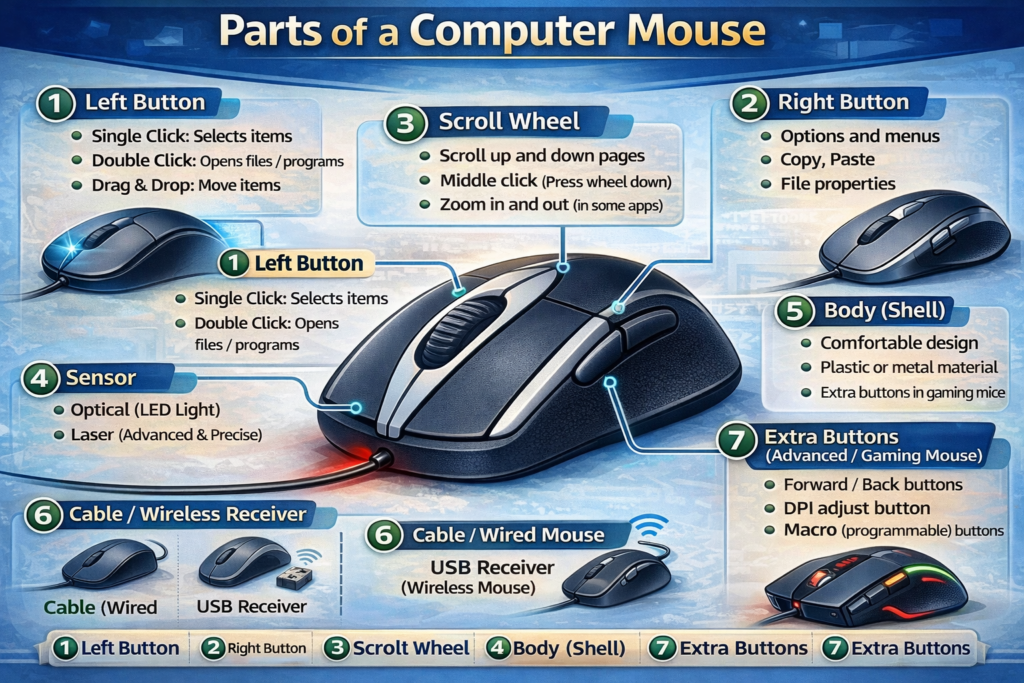
1. Left Button
Left button mouse ka sab se commonly used part hai. Iska kaam hai select karna, click karna aur drag karna.
- Single Click – Ek item select karne ke liye
- Double Click – File ya program open karne ke liye
- Drag & Drop – Items ko ek jagah se doosri jagah move karne ke liye
Left button daily use me sab se zyada use hota hai, chahe aap office kaam kar rahe ho ya gaming.
2. Right Button
Right button menu aur options ke liye use hota hai. Jab aap right-click karte hain, to context menu khulta hai jisme different actions available hote hain, jaise:
- Copy, Paste, Delete
- Properties dekhna
- Shortcuts create karna
Yeh button zyada tar advanced tasks ke liye use hota hai.
3. Scroll Wheel
Scroll wheel mouse ke beech me hota hai. Yeh ek cylinder shape ka wheel hota hai jo page ko upar aur neeche scroll karne me help karta hai.
- Vertical Scroll – Page upar neeche karna
- Middle Click – Kuch applications me shortcut buttons ka kaam karta hai
- Zoom Control – Some software me wheel ka use zoom ke liye bhi hota hai
Scroll wheel ke bina long documents ya websites par navigate karna mushkil hota.
4. Sensor (Optical / Laser)
Mouse ke neeche sensor hota hai jo movement detect karta hai. Yeh type ke mutabiq optical ya laser sensor hota hai.
- Optical Sensor – LED light ka use karke surface movement detect karta hai
- Laser Sensor – Laser ki madad se movement aur precise hota hai, smooth surface par bhi kaam karta hai
Sensor ke baghair mouse ka pointer screen par move nahi karega.
5. Body / Shell
Mouse ki body ya shell woh outer cover hai jise hum haath me pakarte hain. Yeh comfortable aur ergonomic design me hoti hai taake haath zyada der tak thak na jaye.
- Plastic ya metal material ka hota hai
- Ergonomic shape se hand strain kam hota hai
- Gaming mouse me extra buttons aur LED lights bhi shell me hote hain
6. Cable / Wireless Receiver
- Wired Mouse – Cable ke through computer se connect hota hai
- Wireless Mouse – Bluetooth ya USB receiver ke through connect hota hai
Yeh connection ensure karta hai ke mouse accurately aur instantly signal computer tak pohche.
7. Extra Buttons (Advanced / Gaming Mouse)
Gaming aur professional mouse me extra buttons hote hain jo special commands aur shortcuts ke liye use hote hain.
- Forward / Back buttons (web browsing ke liye)
- DPI adjustment buttons (pointer speed control ke liye)
- Macro buttons (gaming ke liye custom commands)
Conclusion
Mouse ke har part ka apna important kaam hai. Left button aur scroll wheel daily use me zyada kaam aate hain, jab ke sensor aur extra buttons advanced tasks me zaroori hote hain. Agar aap mouse ke part